Screen Studio Alternatives for Mac — Auto Zoom on Clicks, Tested with KoeShot and CleanShot X
Published November 25, 2026
Steps checked November 25, 2026 (MacBook Air (M2), macOS Golden Gate 27.2.1)
By Wada Digital Lab
Which Screen Studio alternative to pick depends on how you want it to zoom. If you want one zoom for each click, pick KoeShot. If you want to adjust where and how long it zooms afterward, pick Screen Studio. If you already have CleanShot X, use that. For new buyers, Screen Studio is now only a monthly or yearly payment. We recorded the same page on our blog with 5 clicks and 2 scrolls. KoeShot zoomed once for each of the 5 clicks, and Screen Studio joined clicks made in a row and zoomed 3 times. When we tried CleanShot X on November 15 under different conditions, it stayed zoomed in at 2x for the whole recording and followed the cursor. KoeShot is an app we make and sell, so we write about its weak points the same way.
Key points
- Auto zoom is a feature that, after you stop recording, makes a video that zooms in to follow your clicks and cursor. It is Screen Studio’s best-known feature.
- We recorded 5 clicks and 2 scrolls (about 30 seconds) on the same page on our blog. KoeShot 2.0.3 zoomed 5 times (once for each click). Screen Studio 4.1.0 zoomed 3 times (in this recording, two clicks made in a row were joined into one zoom). Neither zoomed while the page was scrolling; both showed the whole page.
- We tried Studio Mode in CleanShot X 5.0.2 separately on November 15. One “Zoom 200%” was added across the recording, and it stayed at 2x the whole time, following the cursor.
- Without a license, Screen Studio still let us record and play the video back with zooms in its editor. When we clicked “Export,” a window asking for an email address came up, and we could not export the video.
- KoeShot (our app) keeps the original video and makes a second, zoomed video. But when we clicked on empty space, it zoomed in on that space, and the text went off the edge of the screen.
- macOS has no built-in feature that zooms in automatically after recording. You can zoom the screen yourself with the Zoom setting in Accessibility. We have not been able to check whether the zoomed screen shows up in a recording.
- Cap (an open-source recording app) also has auto zoom, but we did not try it. Business use needs a paid license, so we only describe what its official pages say.
The diagram below lays out the results for the three apps and the built-in macOS method as a guide to choosing.
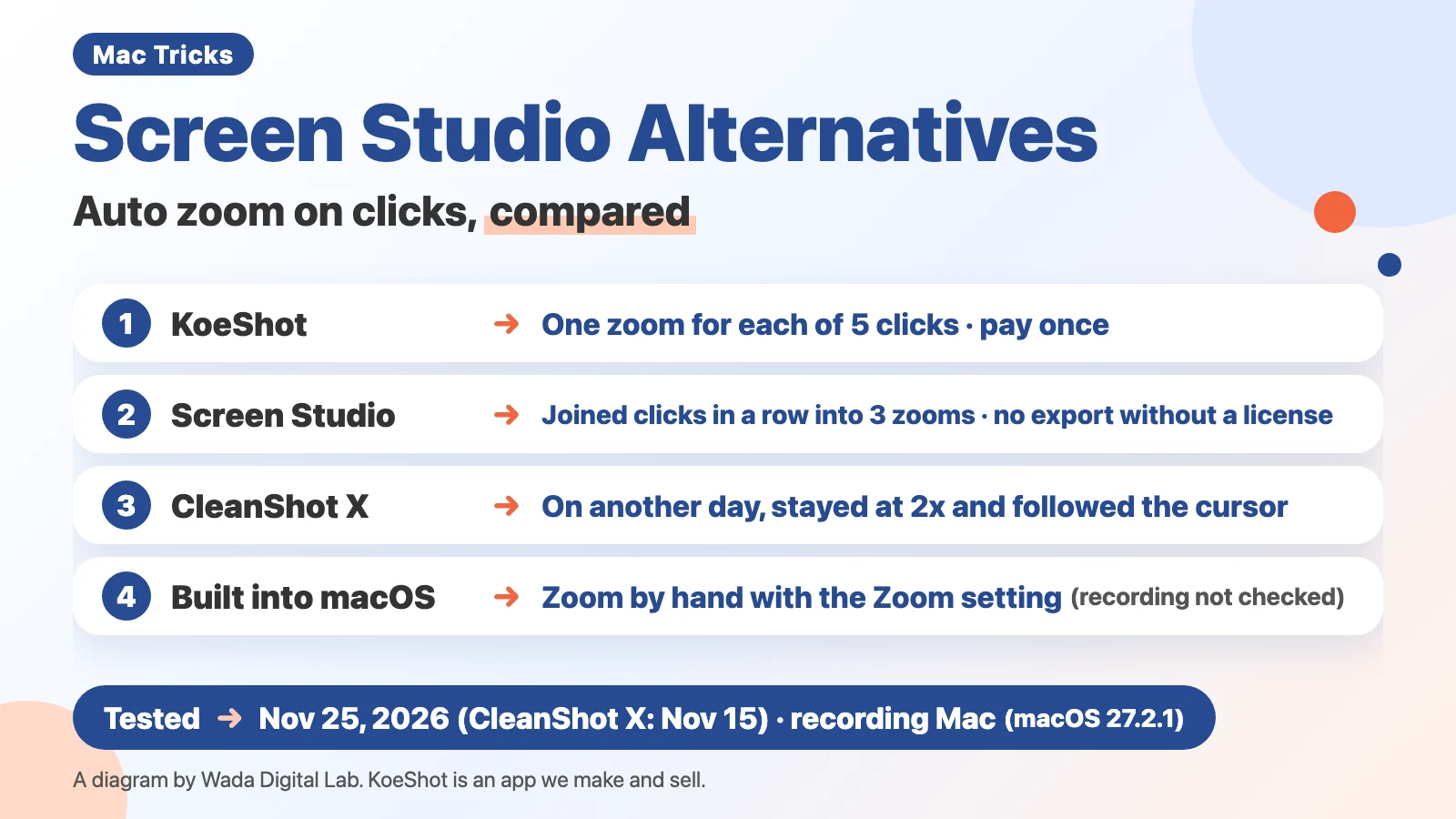
The diagram below shows how each of the three apps zoomed on the same 5 clicks.
KoeShot
Zooms 5
How it zooms
A short zoom for each click
Screen Studio
Zooms 3
How it zooms
Joins two clicks in a row into one
CleanShot X
Zooms 1
How it zooms
Stays at 2x and follows the cursor
What is auto zoom? Editing that moves the view to what you want people to see
Auto zoom is a feature that, after you stop a screen recording, automatically makes a video that zooms in on where you clicked and follows the cursor. In a video that explains how to do something on a Mac, the text on menus and buttons is small, and viewers may not know where to look. In a zoomed video, the place you clicked is clear at a glance.
At Wada Digital Lab, too, when the part we wanted to show in a how-to video was small, we often didn’t know how to zoom in, and gave up. We added auto zoom to KoeShot because we thought it would show viewers at a glance what we want them to look at.
The best-known app for this is Screen Studio. But Screen Studio’s pricing page lists only monthly and yearly payments. To the question “Is Screen Studio free?” it answers “No.” So some people look for an app they pay for once, or an app they already have, that does the same thing.
The short answer: KoeShot for one zoom per click, Screen Studio for adjusting it afterward
- You want one zoom each time you click: KoeShot (our app). It zoomed once for each of the 5 clicks. You pay once, and the original video stays. There is no editor for moving the zooms by hand.
- You want to adjust the zooms in detail afterward: Screen Studio. The zooms are lined up as sections at the bottom of the editor, and you can move them afterward. New buyers pay monthly or yearly.
- You already have CleanShot X: Studio Mode in CleanShot X. In our recording, the whole video stayed zoomed in at 2x and followed the cursor. When you want to show the whole screen, you need to remove the zoom yourself.
- You don’t want another app: Zoom, built into macOS. You press keys yourself to zoom the screen. It does not zoom automatically. We have not been able to check whether the zoomed screen shows up in a recording.
How we tested: 5 clicks and 2 scrolls on the same page
- Mac: our recording MacBook Air (M2), macOS 27.2.1 (26B131), with the Mac set to Japanese. We tried KoeShot and Screen Studio on November 25, 2026.
- App versions: KoeShot 2.0.3, Screen Studio 4.1.0 (English only; there is no Japanese display) and CleanShot X 5.0.2 (November 15). We got CleanShot X from Setapp, a service where you pay monthly to use many Mac apps. The later 5.0.3 (November 23) improved how Studio Mode detects typing (from the CleanShot X changelog: “Improved typing detection in Studio Mode”).
- Page: an article on our blog, how to capture a whole page on a Mac (we opened the Japanese version; the link here goes to the English version), open in Safari with the window filling the screen.
- What we did: we clicked a heading, then the body text, scrolled down, then clicked the empty space on the right and then on the left. We scrolled once more, and last clicked the empty space on the right. That is 5 clicks and 2 scrolls in about 30 seconds. In KoeShot and Screen Studio, we used the same click positions and order.
- Settings: both at their initial settings. In KoeShot, the zoom level is 2x and a ring shows where you click. In Screen Studio, Automatically create zooms (make zooms automatically after recording) is on.
- What we compared: the number of zooms, how long they lasted, whether the place it zoomed to matched where we clicked, what happened while scrolling, how long it took to get the zoomed video, and how far we could go without paying.
- What this test can’t tell you: the clicks were made by software that an AI runs on our recording Mac (we did not test clicks made by hand). We made one recording per app and did not repeat it. CleanShot X was tried separately on November 15 on the same page, with a different window size and a different number of actions. So the CleanShot X numbers were not taken under the same conditions as the other two.
Results: KoeShot zoomed 5 times, Screen Studio 3 times
| App | Zooms | How it zoomed | Time to get it | How you pay |
|---|---|---|---|---|
| KoeShot 2.0.3 | 5 | About 2–3 seconds at 2x for each click | About 20 seconds | Pay once |
| Screen Studio 4.1.0 | 3 | Two clicks in a row joined into one, about 7 seconds each at 2x | About 6 seconds | Monthly or yearly |
| CleanShot X 5.0.2 (November 15) | 1 | 2x for the whole recording, following the cursor | — | Pay once, Pro, or Setapp |
Results from November 25, 2026 (CleanShot X: November 15) on our recording MacBook Air (M2), macOS 27.2.1. “Time to get it” is the time until the zoomed video or the editor was ready: for KoeShot, after clicking Add Auto Zoom; for Screen Studio, after stopping the recording. We did not measure this time for CleanShot X.
In KoeShot and Screen Studio, the zooms landed where we clicked, and while scrolling they did not zoom and showed the whole page. CleanShot X moved with the cursor, whether or not we clicked. Each result comes from one recording per app.
Screen Studio: joins clicks made in a row into one zoom, and won’t export without a license
Good for people who want to fine-tune the zooms afterward. When we stopped recording, the editor opened right away with 3 zooms already added. The first joined the two clicks on the heading and the body text, and the second joined the two clicks on the right and left empty space. All 3 were at 2x.
The screen below is the Screen Studio editor from our separate test on the English screen. The timeline at the bottom shows three automatic zooms, “Zoom 2× Auto.”
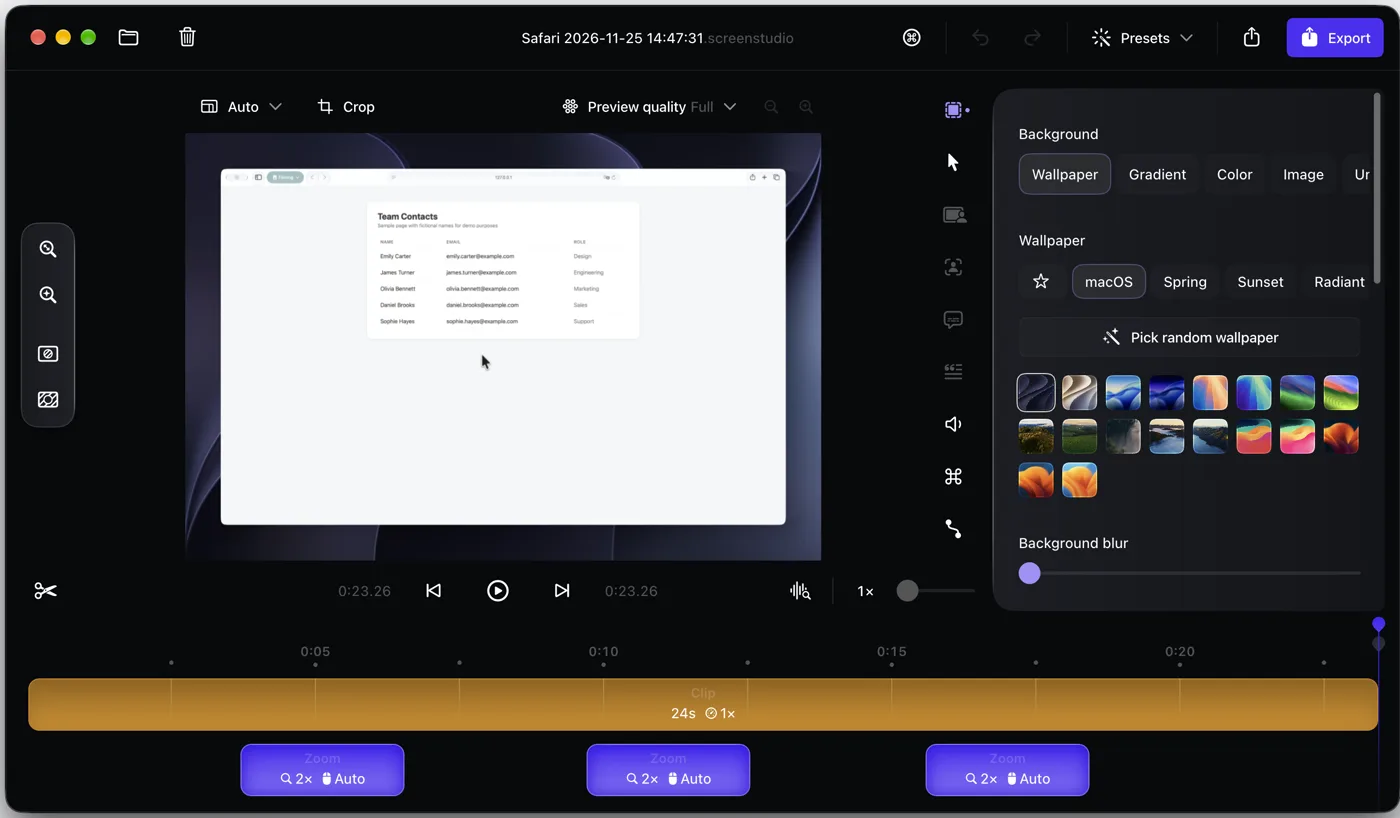
- Good points: the zooms are laid out as sections, so you can change their length and place afterward. In a separate test on the English screen, 3 clicks made about 6 seconds apart each got their own zoom, 3 zooms in all. In our main test, the editor opened about 6 seconds after we stopped recording. You can also change the background and rounded corners on the same screen.
- Things to watch: without a license, we could not export a video. The app is in English only. In the English-screen test, with the initial settings, no ring or other mark showed where we clicked. The first time we opened it, it asked us to agree to its terms of use and for two permissions: Screen & System Audio Recording, and Device Control and Data Access.
- How you pay: new buyers can only pay monthly or yearly (there are discounts for students and teachers). According to the official explanation, licenses that people bought earlier with a one-time payment still work. Prices change, so check Screen Studio’s pricing page.
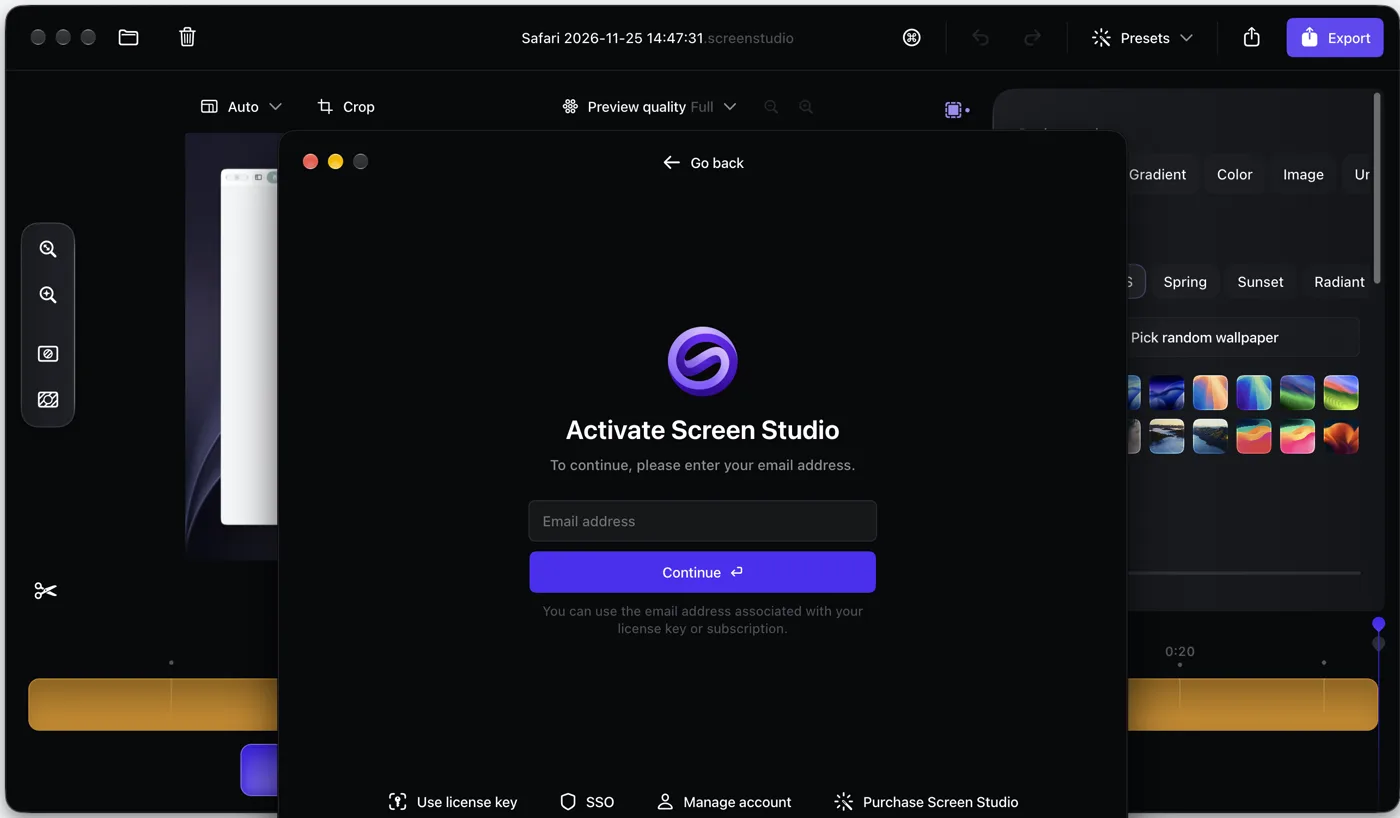
Without a license, what we could do was record and play the video back with zooms in the editor. When we clicked “Export,” the screen below came up.
CleanShot X: zooms the whole recording to 2x and follows the cursor
Good for people who already have CleanShot X. CleanShot X 5.0 (September 2026) added “Studio Mode,” which turns a recording into a finished video. The CleanShot X changelog describes Smart Zooms as “smooth zooms that follow your cursor and draw attention to what matters most.”
On November 15, when we recorded the same page on our blog with “Record in Studio Mode,” one “Zoom 200%” was added across the recording. The exported video stayed zoomed in at 2x almost the whole time and moved with the cursor. There was no time when it showed the whole page.
The screen below is the Studio editor after a Studio Mode recording, from our test on the English screen the same day.
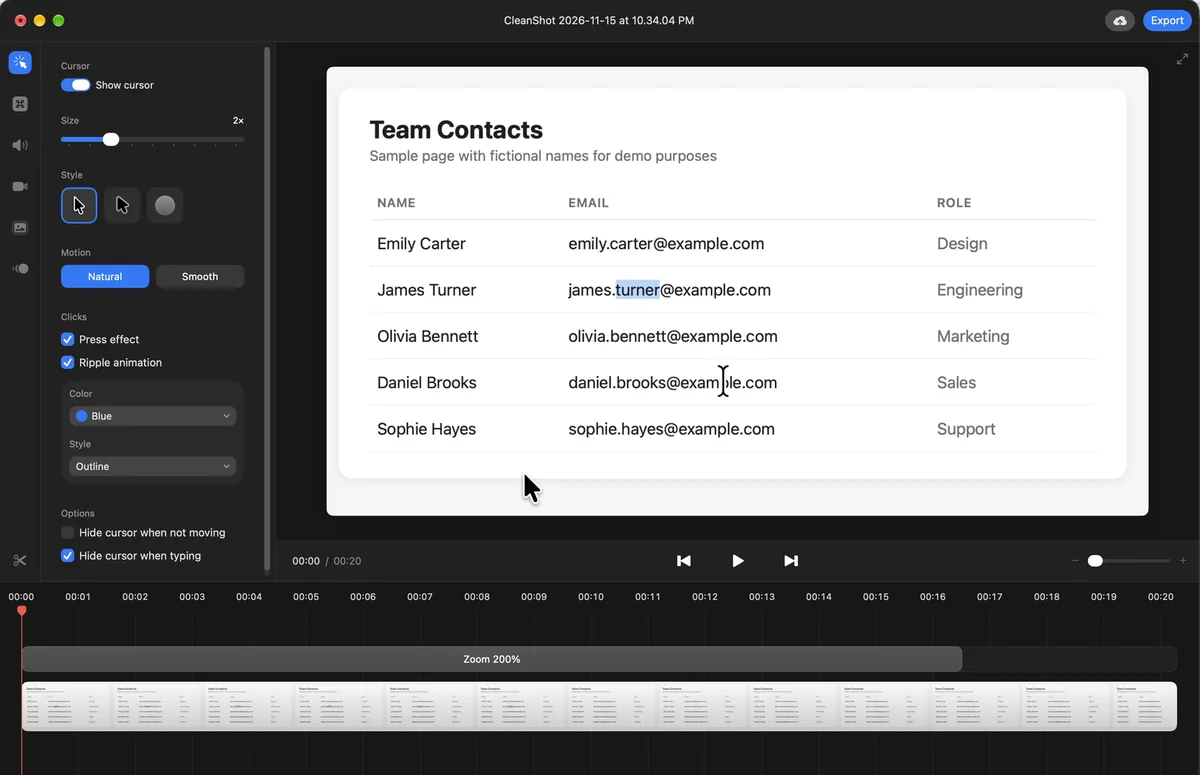
- Good points: screenshots, long-page captures and recordings all in one app. You can also change the cursor size and how smoothly it moves afterward.
- Things to watch: Studio Mode needed the Device Control and Data Access permission. Because it stays zoomed in, you remove the zoom yourself where you want to show the whole screen. It has many features, and at Wada Digital Lab we had not mastered the harder ones. We also found little explanation of it in Japanese.
- How you pay: three ways: pay once (with one year of updates to new versions), Pro paid monthly or yearly, or Setapp. There is more in our CleanShot X review.
KoeShot: makes a video that zooms in on each click, separate from the original
Good for people who want one zoom each time they click. KoeShot is a multi-function screenshot app you control with your voice, which we make and sell. When you stop recording, a thumbnail appears at the bottom right. Clicking “Add Auto Zoom” on it gave us the zoomed video in about 20 seconds. The original video stays as it is, and the zoomed video is saved under a new name, with “-zoom” added to the end of the original name.
The next two screens come from one zoomed video in our separate test on the English screen: the whole page at the start, and the moment we clicked a name. A ring appears where we clicked.
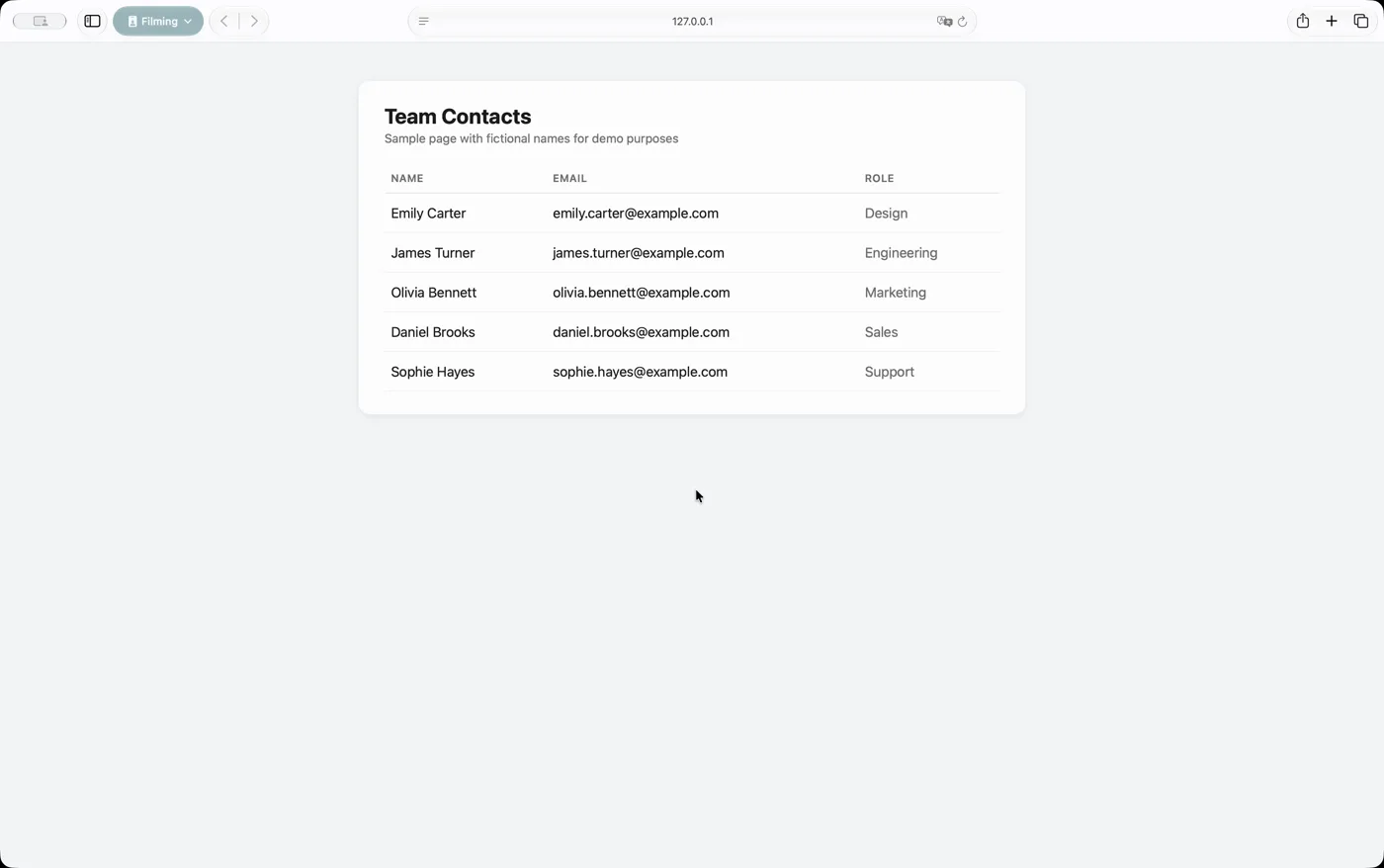
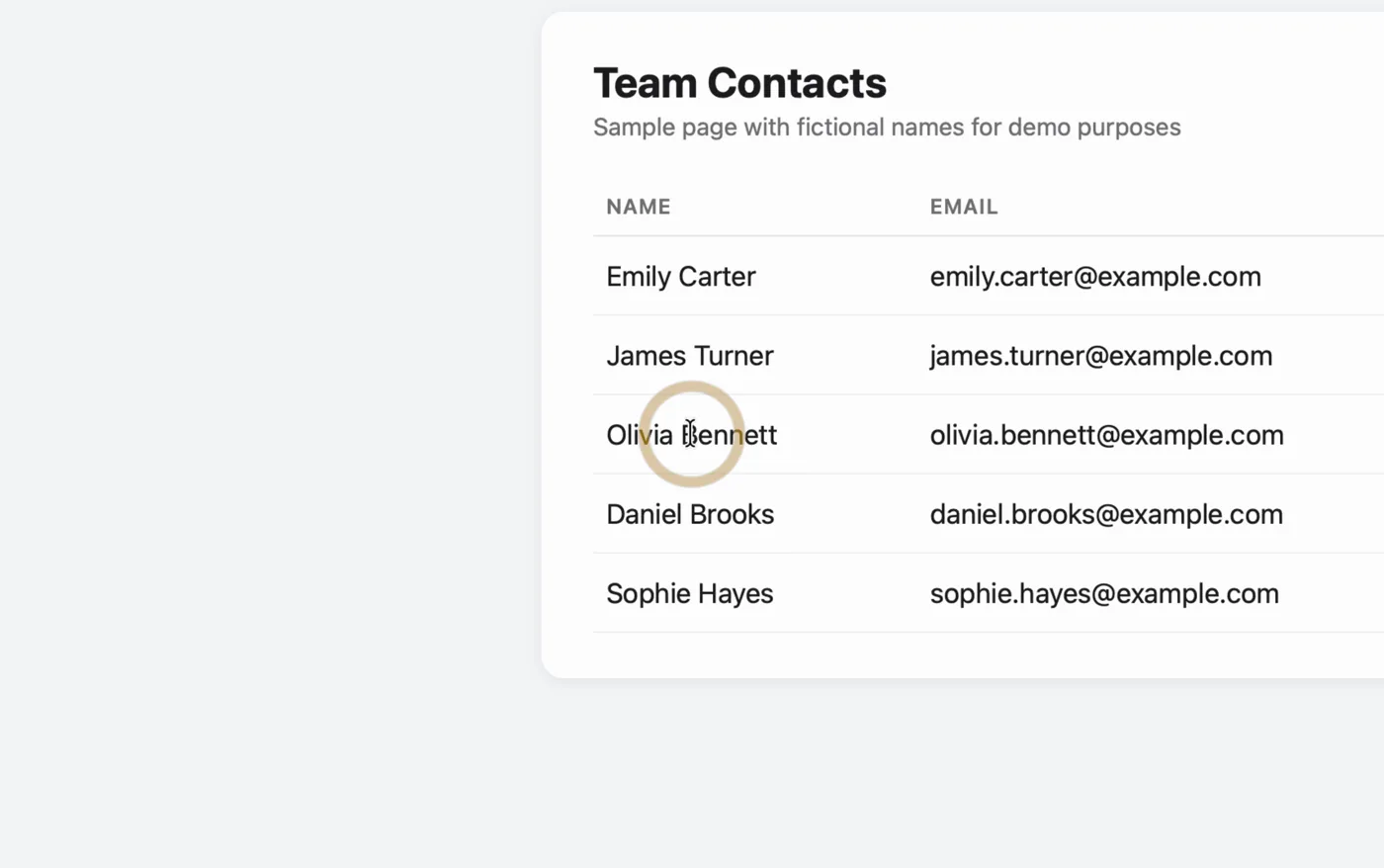
- Good points: 5 clicks got 5 zooms, and all 5 landed where we clicked. In a separate test on the English screen, it started zooming about 0.5 seconds before a click, was fully zoomed in at the click, and went back to normal size about 1.8 seconds later. Because the original video stays, you can use it if the zooms don’t suit you. If you say “Record the screen with auto zoom.” when you start recording, KoeShot also makes the zoomed video when you stop.
- Things to watch: it can’t be added to recordings with no clicks, GIF recordings, or videos recorded with earlier versions. There is no editor for changing where or how long it zooms by hand. When we clicked on empty space, it zoomed in on that space, and the body text went off the edge of the screen (in our main test: clicking the empty space on the right put that space in the center and cut off the text at the left edge). You can choose a zoom level of 1.5x, 2x or 2.5x, but not a different level for each zoom.
- How you pay: you pay once. There is no monthly fee. System requirements: a Mac with Apple silicon (M1 or later) / macOS 26 or later. Intel-based Macs and macOS 15 (Sequoia) or earlier are not supported.
The trouble with auto zoom: too close, or not close enough
When we watched the auto-zoomed videos, some zoomed in too far, and in others we wanted it a little closer. Getting the amount of zoom right felt hard. KoeShot makes a short zoom for each click, so clicking empty space zooms in on empty space. Screen Studio joins two clicks in a row into one, and you can fix the sections afterward. CleanShot X stays at 2x and follows the cursor, so there was no time when it showed the whole page.
Whatever the app, the zoomed video is easier to watch if you decide before recording to “click on the thing you are explaining” and “don’t click on empty space you aren’t explaining.” In KoeShot, if the zoom feels too strong, lower the Zoom Level in its settings to 1.5x.
Built into macOS: zoom the screen yourself with Zoom while you record
Good for people who don’t want another app. macOS has no built-in feature that zooms in automatically after recording. Instead, the Zoom setting in Accessibility lets you zoom the screen yourself while you record.
- Choose Apple menu > System Settings, then click Accessibility in the sidebar.
- Click Zoom.
- Turn on “Use keyboard shortcuts to zoom.”
The screen below shows the Zoom settings in macOS 27.2.1. “Use keyboard shortcuts to zoom” at the top is on.
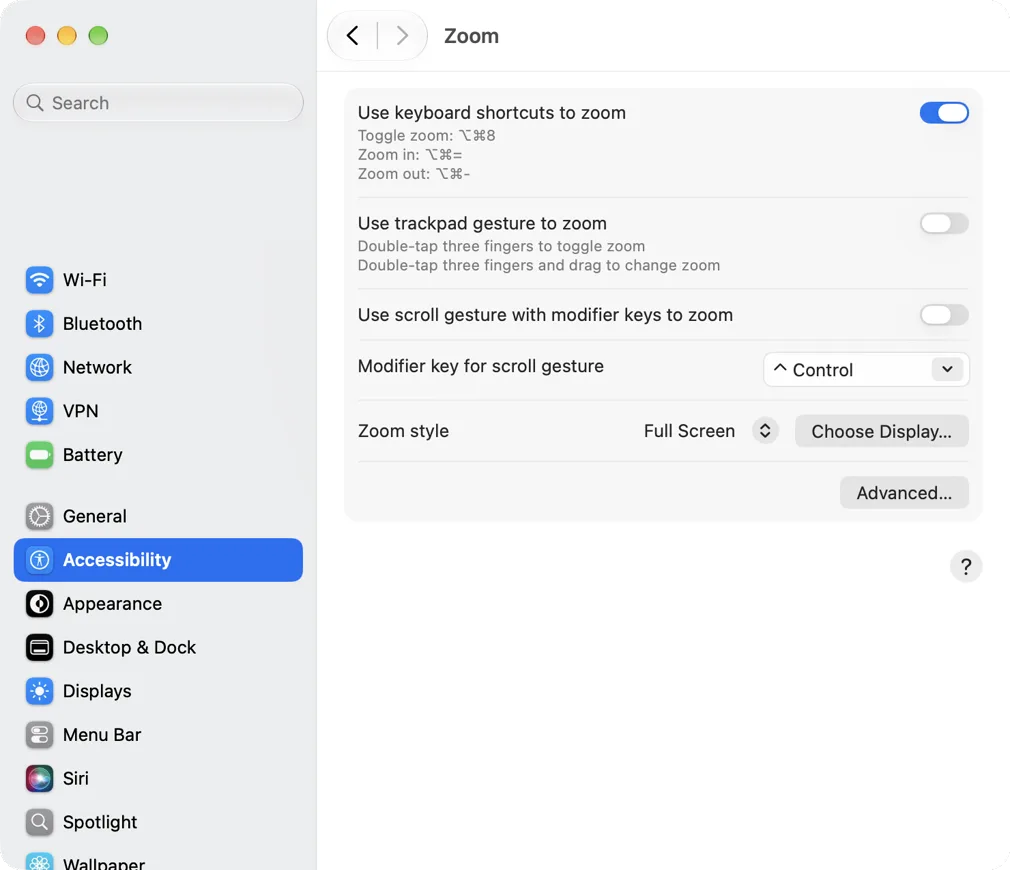
With it on, Option-Command-Equal Sign (=) zooms in, Option-Command-Minus Sign (-) zooms out, and Option-Command-8 quickly switches between the zoomed and normal view. To record, press Shift-Command-5, choose Record Entire Screen or another option in the toolbar that appears, and click Record. If you turn on Show Mouse Clicks under Options in the toolbar, your clicks also show in the recording.
Apple’s Mac User Guide, “Zoom in on your Mac screen,” gives the zoom-in key as “Option-Command-Plus Sign (+).” On the macOS 27.2.1 screen, the zoom-in key was shown as the Equal Sign (=) key.
- Good points: no app to install, and nothing to pay.
- Things to watch: you press keys yourself to zoom in and to zoom back out. In our test, the three keys sent by the automation software on our recording Mac did not turn Zoom on. So we have not been able to check whether the zoomed screen shows up in a recording.
Cap: has auto zoom, but we did not try it
Cap is an open-source screen recording app for Mac, Windows and Linux. According to Cap’s official docs (the Studio Mode documentation), in a recording where Cap has recorded the cursor and clicks, choosing “Click to generate zoom segments” makes zoom sections around the places you clicked.
Cap’s pricing page says the version you use without paying is for personal use only, and business use needs a paid license (yearly or pay once) or Cap Pro. We consider this article business use, so we did not try Cap. We can’t report how it zooms, so it is not in the results table either.
To make it easier: start recording by voice and get a zoomed video too (KoeShot)
If you often make how-to videos, there is also our KoeShot. Press Option-S and say “Record the screen with auto zoom.” Recording starts, and when you stop, KoeShot also makes a video that zooms in where you clicked. To stop recording, press Option-S again or stop it from the menu. To make one every time, turn on “Make an Auto Zoom Video When Recording Stops” under Voice & Recording > Recording in KoeShot’s settings (it is off at first). Auto zoom has been in KoeShot since 2.0.0 (November 16, 2026).
Besides recording, you can ask for screenshots and markup by voice too. For details, see the KoeShot for Mac page.
FAQ
Can I use Screen Studio without paying?
Without a license, we could still record and play the video back with zooms in the editor (Screen Studio 4.1.0, November 25, 2026). When we tried to export a video, the “Activate Screen Studio” window came up and asked for an email address or a license key.
Can I buy Screen Studio with a one-time payment?
Not as a new buyer. On November 25, 2026, the pricing page listed only monthly and yearly payments. According to the official explanation, licenses that people bought earlier with a one-time payment still work. If you want to pay once, KoeShot and CleanShot X both have a one-time purchase.
Is the original video kept after auto zoom?
KoeShot keeps the original video and makes one more, zoomed video under a different name. Screen Studio saves the recording as a project, and its official guide has steps for getting the original recording files out (Extracting raw recording files). We did not check whether CleanShot X keeps the original recording.
Can I auto zoom with a built-in Mac feature?
macOS has no built-in feature that zooms in automatically after recording. If you turn on “Use keyboard shortcuts to zoom” in the Zoom setting in Accessibility, you can zoom in with Option-Command-Equal Sign (=) while you record.
Do these work on Windows?
KoeShot, Screen Studio and CleanShot X are Mac apps. Cap’s official pages say it works on Mac, Windows and Linux.
Test environment and sources
- Test environment: our recording MacBook Air (M2), macOS Golden Gate 27.2.1 (26B131), with the Mac set to Japanese, Safari. We tried KoeShot 2.0.3 and Screen Studio 4.1.0 on November 25, 2026, and CleanShot X 5.0.2 on November 15. We also tried KoeShot and Screen Studio separately with the Mac set to English (3 clicks on a sample Team Contacts page). The screens in this article come from that test, from the Zoom settings captured the same day with the Mac set to English, and from the CleanShot X test with the Mac set to English on November 15.
- What we did not see: a video exported from Screen Studio (it needs a license), how Cap zooms, Studio Mode from CleanShot X 5.0.3 on, whether a screen zoomed with the built-in Zoom shows up in a recording (the keys sent by automation did not turn it on), whether CleanShot X keeps the original recording, and results with clicks made by hand.
- We are not affiliated with the other companies in this article.
- Sources: Apple’s Mac User Guide, “Zoom in on your Mac screen”; Screen Studio pricing; the CleanShot X changelog; Cap pricing; Cap’s download page; Cap’s Studio Mode documentation; Screen Studio’s guide, “Activating Screen Studio”; and Screen Studio’s guide, “Extracting raw recording files” (all read on November 25, 2026).