How to Check YouTube Loudness — The Target Is -14, and Quiet Videos Aren’t Turned Up
Published November 12, 2026
Official documentation reviewed November 12, 2026 (some steps not tested)
By Wada Digital Lab
You can check how YouTube handles your video’s loudness in Stats for nerds: right-click the video on a computer and look at the Volume / Normalized line. YouTube’s target is −14. Videos louder than that are turned down. Quieter videos are not turned up; they play as quiet as they are. Our own video measured −22.9 and played 8.9 decibels below the target.
Key points
- Loudness is how loud people perceive sound, turned into a single number by a set calculation. The unit is LUFS or LKFS, which are the same scale.
- In YouTube’s Stats for nerds, our video showed “100%/100% (cont.-22.9dB tgt.-14.0dB).” The video’s loudness was −22.9, YouTube’s target −14.0, and playback stayed at 100%; it was not turned up.
- Before you publish, you can measure loudness with ffmpeg’s ebur128 filter. Our measurement (−22.9) matched the value YouTube showed.
- You can raise a video that is too quiet with ffmpeg’s loudnorm filter. We took one minute of our video from −23.2 to −14.6 LUFS, with a true peak of −1.2 dBTP.
- Broadcast targets are −24 in Japan and −23 in Europe. If you upload a broadcast mix as is, it plays about 10 LU (the same size as decibels) below YouTube’s target. Flashing and audio sync also have numeric limits.
The diagram below sums up how YouTube treats loudness and how to check it.
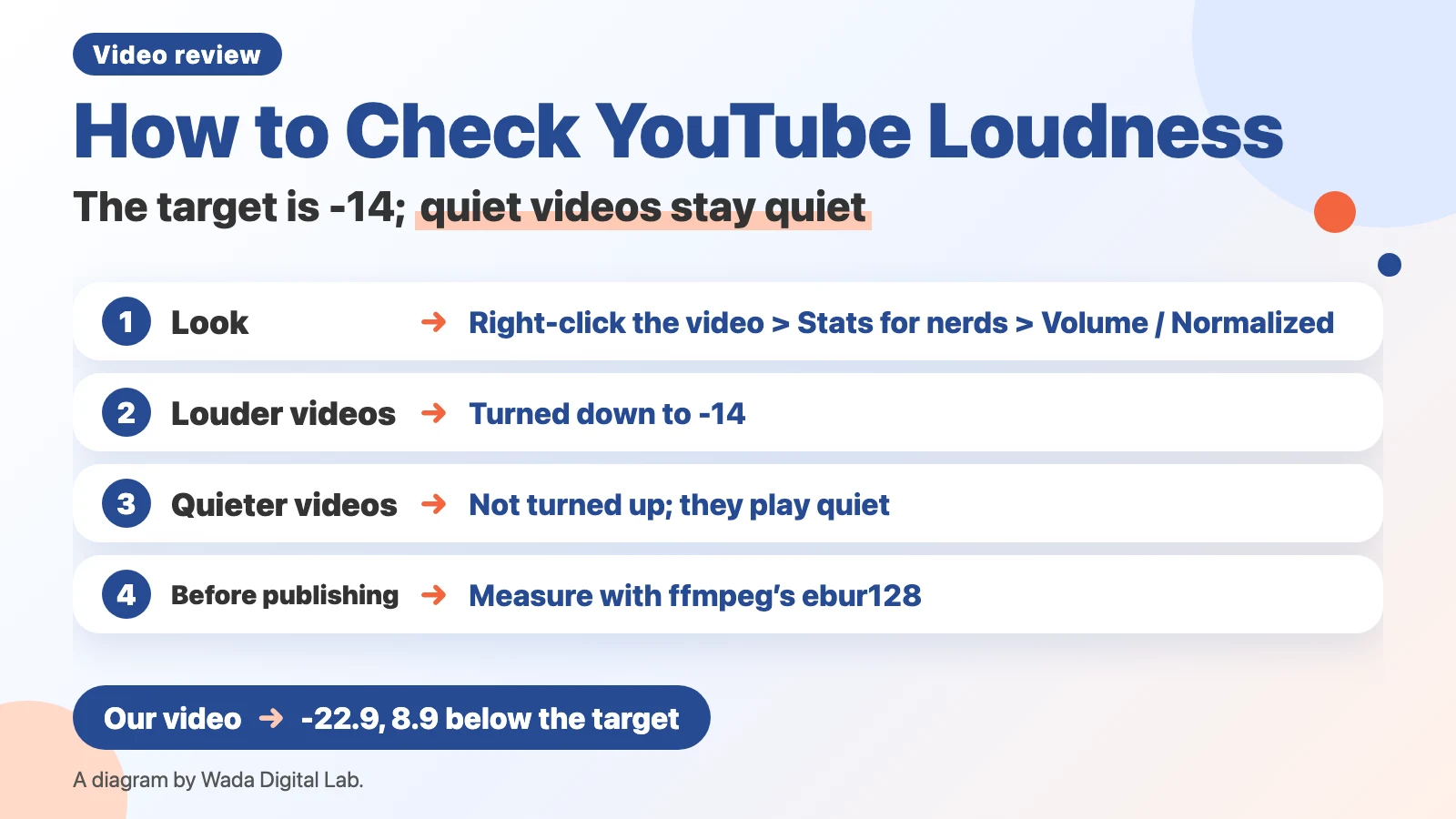
What loudness is: perceived volume as a single number
Loudness is how loud people perceive sound, turned into a single number by a set calculation. It describes how loud the whole video sounds from start to finish. It is a different number from the highest point of the sound wave (the peak). The calculation is defined by an International Telecommunication Union recommendation, ITU-R BS.1770 (as described in EBU R 128).
The unit is LUFS or LKFS. The European broadcast standard EBU R 128 says “‘LUFS’ is equivalent to ‘LKFS’.” Both are the same scale, and numbers closer to 0 are louder: −14 is louder than −23.
How to check YouTube loudness: the Volume / Normalized line in Stats for nerds
For a published video, check it in a web browser on a computer:
- Open the video on YouTube.
- Right-click the video.
- Choose Stats for nerds from the menu.
- Look at the Volume / Normalized line in the panel at the top left of the video.
On one of our long videos (a Japanese video on 1Password basics), the line read:
Volume / Normalized 100%/100% (cont.-22.9dB tgt.-14.0dB)The number after “cont.” is the video’s loudness (−22.9), and the number after “tgt.” is YouTube’s target (−14.0). “100%/100%” is the player volume setting and the volume actually playing. The video is quieter than the target, but it stayed at 100%. YouTube did not turn it up.
For a video louder than the target, the second number drops below 100%, showing it was turned down.
The diagram below shows how YouTube treats videos louder and quieter than the target.
Louder than the target
−11, for example YouTube turns the sound down
It sounds about as loud as other videos
By contrast
Quieter than the target
−22.9, for example The sound is not turned up and plays as is
It sounds quieter than other videos
A video louder than the target is turned down by YouTube, so it sounds about as loud as other videos. A video quieter than the target is not turned up and plays as is, so it sounds quieter than other videos.
YouTube also has separate features that change volume. According to YouTube Help on Stable volume, stable volume balances the range between quiet and loud parts of a video and is on by default (the help page gives steps for Android and TVs). It isn’t available for all videos and is off for YouTube Music and official music videos. Voice boost, on computers and TVs, makes dialogue easier to hear; not all videos support it. We checked Stats for nerds in a web browser on a computer, and we didn’t check how videos sound with these features.
In our search, we didn’t find this target number in YouTube’s help pages. The −14 in this article is the number we saw in Stats for nerds and in a value on the video’s page (loudnessTargetLkfs).
Measure before you publish: LUFS with ffmpeg’s ebur128
Before you publish, you can measure a video with ffmpeg, an open-source program for working with video and audio. On a Mac, first install Homebrew (a system for installing software on a Mac; see the Homebrew page), then type brew install ffmpeg in Terminal. Then type this in Terminal, and a Summary appears at the end. For “video.mp4,” drag your video file into the Terminal window to insert its location.
ffmpeg -i video.mp4 -vn -af ebur128=peak=true -f null -The “I:” line is the loudness of the whole video. The “Peak:” line is the true peak (the highest point of the sound wave). Here are our results; for the videos on YouTube, the numbers matched Stats for nerds.
| Our video | Measured with ffmpeg | YouTube’s value |
|---|---|---|
| Long video (1Password basics) | −22.9 LUFS (peak −4.6) | cont.-22.9dB tgt.-14.0dB |
| Long video (how to update to macOS 27.2) | −22.9 LUFS | −22.87 (value on the video’s page) |
| Long video (1Password tips) | −19.2 LUFS | −19.24 (value on the video’s page) |
| App demo video (for a product page) | −15.4 LUFS (peak −1.4) | Not on YouTube |
Our app demo videos were matched for loudness when we made them, so they measured −15.4. Our long videos had no such step and were published at −19 to −23. None of the 115 revision notes from reviewing 42 of our videos from October 21 to November 12, 2026 was about loudness. Even after watching, listening, and writing notes, a difference in loudness can go unnoticed.
Raise a video that’s too quiet: bring it toward −14 with ffmpeg’s loudnorm
You can raise a quiet video with ffmpeg’s loudnorm filter. We ran this on one minute of our long video (−23.2 LUFS):
ffmpeg -i video.mp4 -af loudnorm=I=-14:TP=-1.5:LRA=11 -ar 48000 -c:v copy -c:a aac -b:a 192k louder.mp4The result measured −14.6 LUFS with a true peak of −1.2 dBTP. dBTP (true peak) is the value of the highest point of the sound wave. “I=-14” is the target loudness, “TP=-1.5” is the ceiling you ask for, and “LRA=11” is the target loudness range (how far loud and quiet parts may differ). The finished file’s peak, −1.2 dBTP, came out a little higher than the −1.5 we asked for. If you must stay under a ceiling, ask for a lower one and measure the finished file again. Without “-ar 48000,” the audio sample rate changed to 96,000 Hz. For a more exact result, there is a two-pass method: measure first, then give the measured values to loudnorm in a second run (see the loudnorm section of the FFmpeg documentation). When we did two runs, we got −14.2 LUFS with a true peak of −1.1 dBTP.
Other targets: −24 for Japanese TV, −23 for European broadcasting
Loudness targets depend on where the video plays. A mix made for TV and uploaded as is plays about 10 LU below YouTube’s target.
| Where it plays | Target loudness | Peak ceiling | Source |
|---|---|---|---|
| YouTube | −14 (only louder videos are turned down) | Not published | What we saw in Stats for nerds |
| Japanese TV | −24 LKFS (±1) | −1 dBTP | ARIB TR-B32 (table in ITU-R BS.2434) |
| European broadcasting | −23.0 LUFS | −1 dBTP | EBU R 128 |
The Japanese TV numbers come from the table of countries in the ITU report ITU-R BS.2434. The European number is the “Target Level of −23.0 LUFS” in EBU R 128. The −1 dBTP in EBU R 128 is a ceiling for uncompressed audio during production; it notes that some distribution systems may need a lower one.
Other numbers to check before delivery: flashing, sudden scene changes, and audio sync
Besides loudness, a few things are hard to judge by eye and have numeric limits. Professional delivery checks these three as well.
| What | Limit | Source |
|---|---|---|
| Flashing images or lights | As a rule, no more than 3 flashes in one second. Applies when the flashing area is over a quarter of the screen and brightness changes by 10% or more. Be especially careful with saturated red | NHK and the Japan Commercial Broadcasters Association guideline |
| Sudden scene changes | As a rule, no more than 3 per second for a high-contrast reversal of the image, or a scene change where screen brightness changes by over 20% | Same guideline |
| Voice and mouth out of sync | Starts to be noticed at about 45 ms with sound early, or 125 ms with sound late. Acceptable up to about 90 ms early, or 185 ms late (both are averages from TV viewing tests) | ITU-R BT.1359-1 |
The flashing limit is in the guideline on animation and visual techniques by the Japan Commercial Broadcasters Association and NHK, which says to avoid flashing more than three times in one second as a rule. The web accessibility rule WCAG 2.3.1 draws a similar line: pages should not contain anything that “flashes more than three times in any one second period,” unless the flashes are below set thresholds (WCAG measures the area as 25% of any 10 degree visual field on the screen, not a quarter of the whole screen). The audio sync numbers come from TV viewing tests in the ITU recommendation ITU-R BT.1359-1 (averages). Whether a delivery passes depends on the delivery spec of the client or platform. The brightness numbers in the table are for standard dynamic range (SDR) video; HDR video has separate limits set in cd/m².
Frequently asked questions
What happens if I make my video louder than −14?
YouTube turns it down to −14. In Stats for nerds, the second number drops below 100%. Even if you make it louder, viewers hear it at about the same loudness as a −14 video.
Should I write LUFS or LKFS?
Either; they are the same scale. Japanese TV and ITU documents use LKFS, and the European broadcast standard uses LUFS.
Is the balance between voice and music set by a number too?
Overall loudness is measured with the voice, music, and sound effects together. EBU R 128 says the whole program is measured without emphasis on speech, music, or sound effects. Check by ear that the voice isn’t buried under the music.
Things to check in text, picture, and pacing are in How to Review a Video Before You Publish. Numbers for subtitle speed are in Subtitle Characters per Line.
What we tested, and sources
- On November 12, 2026, we measured our videos with ffmpeg 8.1.2 on a MacBook Air (M4) running macOS 27.0.1. We checked YouTube’s Stats for nerds the same day by opening our published video in a web browser and right-clicking it. We didn’t try the two-finger click on a trackpad.
- The numbers for “-ar 48000” and for two runs come from one minute cut from one of our long videos.
- Sources: EBU R 128, ITU-R BS.2434, ITU-R BT.1359-1, the Japan Commercial Broadcasters Association guideline, and WCAG 2.3.1. We didn’t read the text of ARIB TR-B32 itself (the numbers are from the ITU-R BS.2434 table).