Subtitle Characters per Line — 42 per Line and 20 per Second, and What We Counted on YouTube
Published November 12, 2026
Official documentation reviewed November 12, 2026 (some steps not tested)
By Wada Digital Lab
For English subtitles, a common rule is up to 42 characters per line, two lines at most, and up to 20 characters per second for adult programs (17 for children’s programs). These numbers come from the subtitle style guide Netflix publishes for the people who make its subtitles. Each subtitle stays on screen between 5/6 of a second and 7 seconds. We also counted the English subtitles on our own YouTube videos and share how to count yours.
Key points
- Netflix’s English (USA) subtitle guide allows 42 characters per line and up to 20 characters per second for adult programs, 17 for children’s programs.
- Netflix’s general requirements for all languages: two lines at most, and each subtitle on screen for at least 5/6 of a second (20 frames at 24 frames per second) and at most 7 seconds. The Japanese guide sets a shorter minimum of 0.5 seconds.
- Japanese subtitles have much tighter limits: 13 full-width characters per line and 4 characters per second, with half-width characters counted as half. Japanese SDH (subtitles for viewers who are deaf or hard of hearing), which keeps as much of the original wording as possible, allows 16 per line for horizontal subtitles and 7 per second.
- On three of our YouTube videos, the middle value for English subtitles was 15.1 to 15.6 characters per second, and 20 of 290 subtitles went over 20. No line went over 42 characters; the longest was 38.
- You can count characters per second from a subtitle file (SRT): characters divided by seconds on screen. A short script for the Mac is below.
The diagram below sums up the subtitle length rules and how to count them.
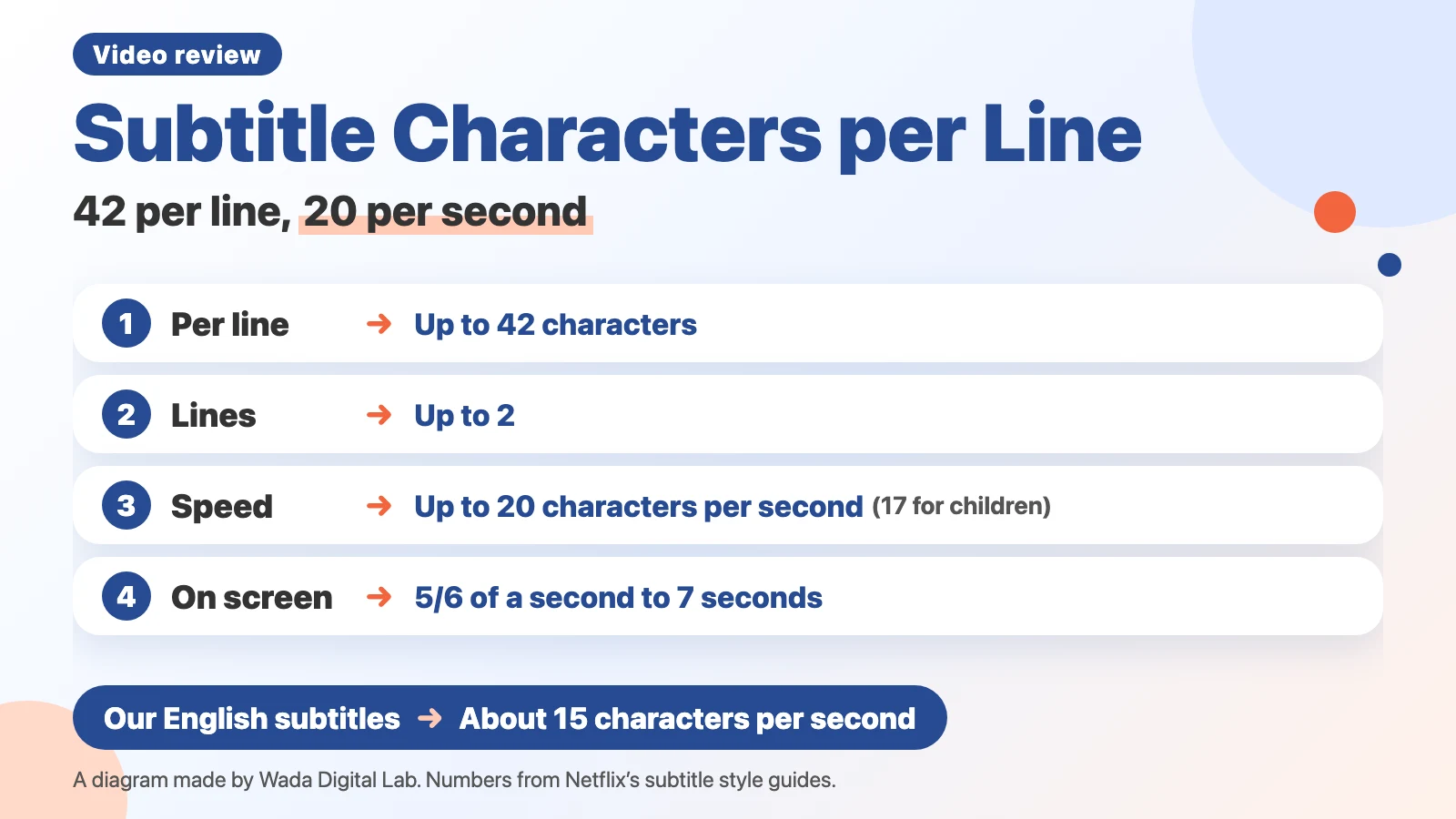
Subtitle length rules: 42 characters per line, two lines, 20 characters per second
Subtitle length rules are limits on characters per line, number of lines, and characters per second, so that viewers can finish reading each subtitle. Netflix publishes specific numbers in its guides. Its English (USA) Timed Text Style Guide gives the line limit as “42 characters per line” and the reading speed as “Adult programs: Up to 20 characters per second.”
| Rule | English subtitles | Japanese subtitles |
|---|---|---|
| Characters per line | Up to 42 | Up to 13 (horizontal), 11 (vertical) |
| Lines | Up to 2 | Up to 2 |
| Characters per second | Up to 20 for adults, 17 for children | Up to 4 |
| Time on screen | 5/6 of a second to 7 seconds | 0.5 seconds to 7 seconds |
| Numbers | Spell out zero to ten; use numerals above ten. Always use numerals for ages; spell out a number that begins a sentence; numerals are permitted for units and dates | Horizontal: one digit full-width, two or more digits half-width |
Time on screen and the number of lines come from Netflix’s Timed Text Style Guide: General Requirements, which applies to every language. The Japanese numbers come from the Japanese Timed Text Style Guide.
How many characters fit: seconds on screen × 20
At 20 characters per second, the upper limit for a subtitle is its seconds on screen multiplied by 20. A subtitle shown for 2 seconds can hold 40 characters; one shown for 1.5 seconds, 30. With two lines of 42 characters, a full subtitle has 84 characters, which needs 4.2 seconds on screen.
What we found on our own YouTube videos: about 15 characters per second
We counted the English subtitles on three of our long YouTube videos, made in October and November 2026, from their subtitle files.
| What we counted | English subtitles (3 videos) | Japanese subtitles (4 videos) |
|---|---|---|
| Characters per second (middle value) | 15.1 to 15.6 | 6.2 (all 311 together) |
| Subtitles over the limit (20 English, 4 Japanese) | 20 of 290 | 307 of 311 |
| Japanese subtitles over 7 per second (the Japanese SDH limit) | (English uses the same 20) | 84 of 311 |
| Characters per line (middle value, longest) | 26 to 30, longest 38 | 15 to 17, longest 24 |
| Lines | Up to 2 | Up to 2 |
Most of our English subtitles stayed under 20 characters per second, and no line went over 42. Our Japanese subtitles went over the Japanese limit of 4 almost every time. That is because our subtitles show the narration word for word. Netflix’s English guide asks subtitlers to meet the reading speed by shortening: “When editing for reading speed, favor text reduction, deletion and condensing.” Our subtitles aren’t shortened, because shortening them would make them stop matching the voice. Measured against the Japanese SDH limit of 7 per second, 84 of our 311 Japanese subtitles went over.
The diagram below shows the difference between subtitles that can be shortened and subtitles that show the narration as spoken.
Subtitles that can be shortened
Translated film and TV subtitles A translator can shorten what is said
Easy to keep within the reading speed
By contrast
Subtitles that match the voice
Narration shown word for word Shortening them makes the voice and subtitles stop matching
Easy to go over the reading speed
Translated film and TV subtitles are easy to keep within the reading speed. Narration shown word for word is easy to go over the reading speed. Of the 115 revision notes added to 42 of our videos, none said the subtitles were too fast. The subtitle notes were about size, where lines break, and how product names were written. These notes came from our own reviewer, not from a test with viewers. Based on them, we think line length and where the line breaks matter more than characters per second for subtitles that match the voice.
What to check in subtitles besides length: five things
- Lines break in a natural place. When you split a line in two, or carry a sentence to the next subtitle, break at a natural phrase. Netflix’s English guide asks you not to separate, for example, a first name from a last name. We got the note “Please adjust where the phrases break.”
- Product and app names are spelled the way the product spells them. Check capitals, spaces, and hyphens.
- Numbers follow one rule. Netflix’s English guide spells out zero to ten and uses numerals above ten, with exceptions such as ages (always numerals), a number that begins a sentence (spelled out), and units or dates (numerals are permitted).
- Subtitles don’t cover on-screen text. Netflix’s general requirements say: “Please ensure subtitles are positioned accordingly to avoid overlap with onscreen text.”
- The text is large enough on a phone. We got the note “Aren’t the captions too small?”
Count subtitle speed on a Mac: characters ÷ seconds from an SRT file
If you have a subtitle file (SRT), you can count characters per second for each subtitle from its characters and its seconds on screen.
- Open TextEdit, create a new document, and choose Format > Make Plain Text.
- Paste the script below and save it in your Documents folder as “subtitle_speed.py.” If TextEdit adds “.txt” to the name, remove it so the name ends in “.py.”
- Put the subtitle file in the same Documents folder (for example, “subtitles.srt”).
- Open Terminal, type
cd ~/Documents, and press Return. - Type
python3 subtitle_speed.py subtitles.srtand press Return.
Each subtitle gets a line with its seconds, characters, characters per second, and the longest line. Subtitles over the limits for adult programs (20 per second, 42 per line, two lines) get a star. For children’s programs, change 20 to 17 in the script. Formatting tags in the subtitles, such as <i>, are not counted.
import sys, re

def length(text):
    # leave out formatting tags such as <i>
    return len(re.sub(r'<[^>]+>', '', text))

def seconds(t):
    h, m, s = t.strip().replace(',', '.').split(':')
    return int(h) * 3600 + int(m) * 60 + float(s)

blocks = open(sys.argv[1], encoding='utf-8-sig').read().strip().split('\n\n')
for b in blocks:
    lines = b.splitlines()
    times = [l for l in lines if '-->' in l][0]
    start, end = times.split('-->')
    text = lines[lines.index(times) + 1:]
    sec = seconds(end) - seconds(start)
    chars = sum(length(l) for l in text)
    longest = max(length(l) for l in text)
    mark = '*' if chars / sec > 20 or longest > 42 or len(text) > 2 else ''
    print(f'{lines[0]}\t{sec:.2f}s\t{chars} chars\t{chars / sec:.1f}/s\tlongest {longest}\t{mark}')
For the first subtitle of one of our long videos, it printed “1 2.40s 38 chars 15.8/s longest 19.” The first time you type python3 on a Mac, you may be asked to install the command line developer tools.
To find typos in captions with AI rather than count characters, see How to Check Video Captions for Typos with AI.
Frequently asked questions
Are captions and subtitles the same thing?
In everyday use the words overlap. Netflix’s guides call the on-screen text for dialogue “subtitles,” and use “SDH” for subtitles that also describe sounds for viewers who are deaf or hard of hearing. The numbers in this article are for text that shows what is said. For how titles differ from captions in Final Cut Pro, see How to Add Text in Final Cut Pro.
What if a line doesn’t fit in 42 characters?
Split it into two lines, or carry it to the next subtitle, breaking at a natural phrase. If you can shorten the wording, shorten it. If the subtitles must match the voice word for word, keep each line short enough to read on a phone.
Other things to check besides subtitles, and the order to check them in, are in How to Review a Video Before You Publish.
What we tested, and sources
- The subtitle rules come from Netflix’s English (USA) Timed Text Style Guide, Timed Text Style Guide: General Requirements, and Japanese Timed Text Style Guide, read on November 12, 2026.
- Before writing, we read the top search results for “subtitle characters per line.”
- Our subtitle numbers come from the subtitle files of our long YouTube videos (3 English and 4 Japanese), counted on November 12, 2026 with the same method as the script, using python3 on a MacBook Air (M4) running macOS 27.0.1.
- The number of notes comes from 115 notes added to 42 of our videos.