How to Check a Video with AI — What Gemini Caught and Got Wrong in Our Test
Published November 12, 2026
Official documentation reviewed November 12, 2026 (some steps not tested)
By Wada Digital Lab
AI can check a video for caption typos, captions that don’t match the voice, and notifications that shouldn’t be on screen. We made a 23-second video with four planted mistakes and showed it to Gemini (through Antigravity) twice. Both times it found all four, including a typo that was on screen for only 0.4 seconds. But its times were off by up to about 1.3 seconds, it misread a character, and once it described a voice that wasn’t there. Check each AI note against the actual frame before you fix anything.
Key points
- You can give a video file to Gemini (the app and the API) and to Antigravity, a Google tool that runs on Gemini. ChatGPT accepts video attachments, but availability varies by platform, upload method, and account, and OpenAI says it “may not analyze the entire video or accurately interpret its audio.” Claude takes images only, so you give it frames from the video.
- In our test, Gemini (Antigravity) found a 3-second typo, a 0.4-second typo, a caption that didn’t match the voice, and a 0.5-second notification, both times.
- It also made mistakes: times off by up to about 1.3 seconds, a 0.5-second notification described as lasting 2 seconds, a misread character, and a voice line that wasn’t in the audio.
- Both times, the AI said it couldn’t actually listen to the audio and had only read a transcript. Pronunciation and loudness still need your ears and an audio tool.
- In our own 13 long videos, some AI notes turned out to be wrong when we checked the frames (for example, “macOS 26.6 doesn’t exist”). Use AI as a second reviewer that cuts down what you miss, and decide each fix yourself from the frame.
The diagram below shows what the AI found and missed in our test, and the part a person handles.
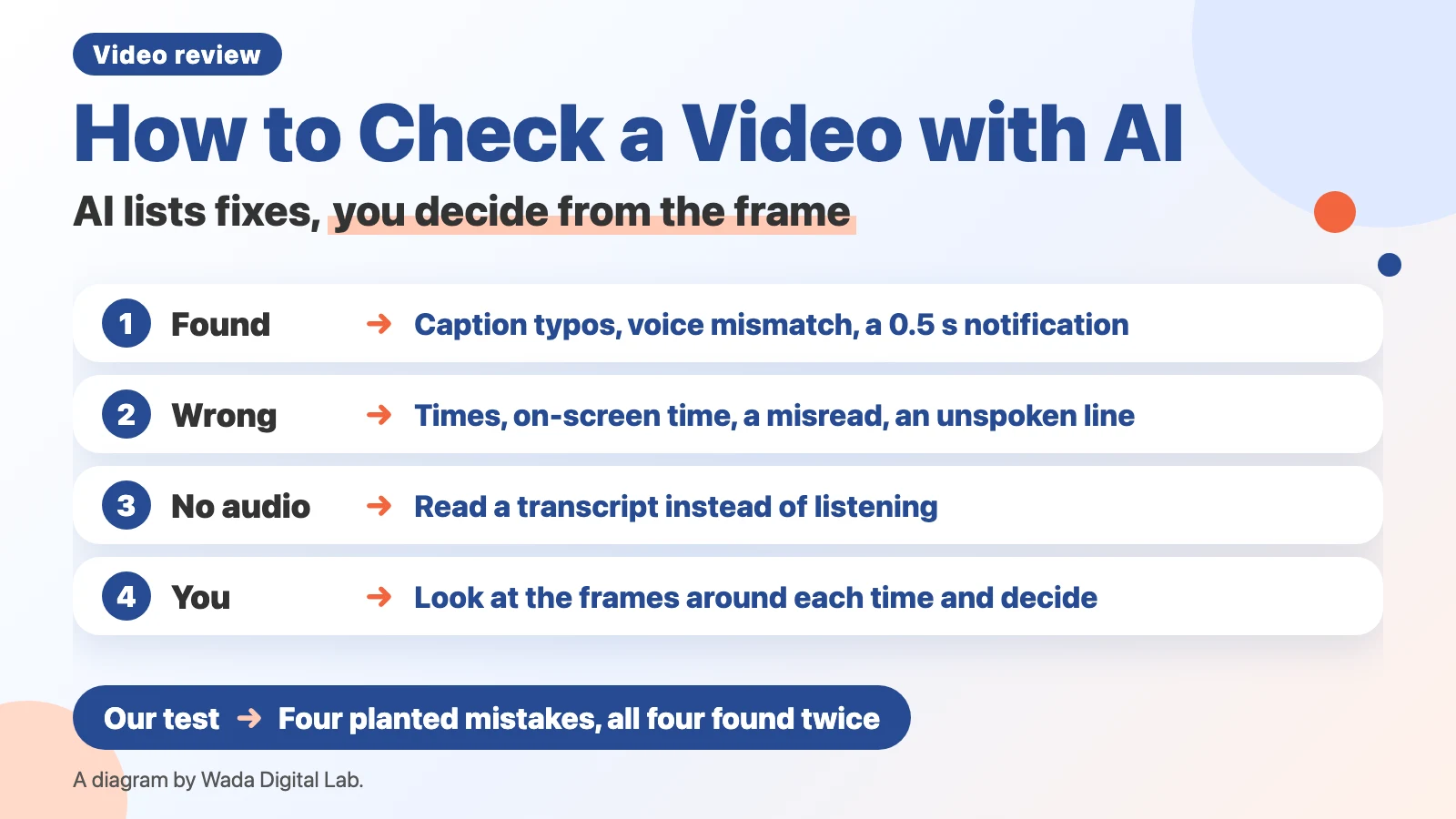
What it means to check a video with AI: the AI lists possible fixes with times
Checking a video with AI means giving the video file to an AI and having it list caption mistakes, mismatches between the voice and the captions, and things that shouldn’t be on screen, each with a time. What the AI gives you is a list of possible fixes. A person looks at the frame at that time and decides whether to fix it.
Which AI can take a video: Gemini, Antigravity, ChatGPT, and Claude through images
| AI | Takes a video? | What the maker says |
|---|---|---|
| Gemini app | Yes | Up to 2 GB per file. Up to 5 minutes in total (1 hour with Google AI Pro or Ultra) |
| Gemini API | Yes | Lets programs call Gemini. Samples 1 frame per second by default. Fast action or quick cuts can lose detail |
| Antigravity | Yes (we use it) | (Our own use, not an official description) We give it an MP4 file and choose Gemini 3.8 Flash as the model |
| ChatGPT | Can attach (varies by platform, upload method, and account) | May not look at the whole video or hear the audio correctly |
| Claude | No (images only) | JPEG, PNG, GIF, and WebP images |
Sources: Google’s “Upload & analyze files in Gemini Apps” and “Video understanding,” OpenAI’s “ChatGPT Image Inputs FAQ,” and Anthropic’s “Vision.” The Gemini API page says “1 frame per second,” and the ChatGPT page says “It may not analyze the entire video or accurately interpret its audio.”
Anthropic’s page doesn’t mention video. We pull frames out of the video as images and give those to Claude, as described in How to Ask Claude Code to Fix a Video.
We also gave the same sample video to ChatGPT, the Gemini app, and Claude Code twice each. The results are in How to Get ChatGPT to Read a Video.
Our test: a 23-second video with four planted mistakes, shown to Gemini twice
We made a 23-second sample video that explains a settings screen, with Japanese captions and a Japanese voice, and planted four mistakes. We placed the 0.4-second and 0.5-second mistakes so they don’t show at the whole seconds (12 and 20). We asked Antigravity (running Gemini 3.8 Flash) to “check it from start to finish as a final review before publishing and list mistakes with times” — the same way we ask it to check our own long videos.
| Planted mistake | Run 1 | Run 2 |
|---|---|---|
| Caption typo, one wrong character (6.0–9.0 s, 3 seconds) | Found (0:06) | Found (0:06) |
| Caption typo, one wrong character (12.3–12.7 s, 0.4 seconds) | Found, but at 0:11. Said the transcript there read “close,” though there was no voice | Found (0:12). Misread the wrong character as a different one |
| Voice says “save,” caption says “delete” (15.0–18.0 s) | Found | Found |
| Mail notification (20.3–20.8 s, 0.5 seconds) | Found. Wrote “0:19–0:21” | Found. Wrote “0:20–0:22” |
It found all four, both times. The Gemini API page says the default is 1 frame per second, but in this test it also found the 0.4-second typo and the 0.5-second notification. How Antigravity reads a video isn’t published, so we can’t say it will always catch a typo or notification that shows for only about half a second. Both times it also added a suggestion we didn’t ask for: “the action of choosing the tab isn’t shown on screen.” Each run took 95 and 112 seconds.
Where the AI was wrong: times, how long things were on screen, a misread character, and a transcript of a voice that wasn’t there
Even for the four it found, the AI’s reports had mistakes you shouldn’t copy straight into your fixes.
- Times. It put the typo that starts at 12.3 seconds at “0:11,” about 1.3 seconds off.
- How long it was on screen. It wrote the notification that was on screen for 0.5 seconds as “0:19–0:21” and “0:20–0:22,” as if it lasted about 2 seconds.
- A misread character. In one run it read the wrong character in the typo as yet another character.
- A transcript of a voice that wasn’t there. In one run it said the transcript at 12 seconds read “close,” an unspoken line where there was no voice. In the other run it correctly said there was no transcript there and the audio might be missing.
Both times, the AI itself said it couldn’t listen to the actual audio and had only read a transcript. Its answers don’t check pronunciation, loudness, or noise.
In our 13 long videos: AI notes that were wrong when we checked the frames
From October 28 to November 12, 2026, we showed each of our 13 long videos to Antigravity before finishing it. When we checked the AI’s notes against the actual frames and the caption files, some were wrong.
| AI note | What the frames showed |
|---|---|
| “macOS 26.6 doesn’t exist” | It exists. The AI’s knowledge was out of date |
| Read a word in a table as another word | A misread |
| The Shift key mark isn’t shown | It was shown. A miss |
| The next caption appears too early | The caption file and the frames showed the previous caption still on screen |
On the other hand, it also caught things people had missed, such as a mail notification on screen, a leftover piece of a caption, and a heading overlapping a character’s hair.
The diagram below splits the work between the AI and a person.
The AI
Lists possible fixes Caption typos, voice and caption mismatches, and things on screen, with times
You miss less
Hands over the list
A person
Checks the frames and decides Looks at the frames around each time to see if it’s really a mistake
You don’t fix what doesn’t need fixing
The AI lists caption typos, voice and caption mismatches, and things on screen, with times, so you miss less. A person looks at the frames around each time to see if it’s really a mistake, so you don’t fix things that only the AI got wrong.
How to ask: separate what it saw from what it guesses, and say what it didn’t check
We put these four things in our request.
- Write what it actually saw (observed) separately from what it guesses (inference).
- Mark only certain mistakes as “fix,” and matters of taste as “suggestion.”
- If it couldn’t watch or listen to all of it, say which parts it didn’t check. If it couldn’t hear the audio, say so.
- Answer in a fixed format: time, what it saw, guess, how to fix, and how sure it is.
Check this video from start to finish as a final review before publishing.
Look for: caption typos, captions that don't match the voice, things that shouldn't be on screen, and anything cut off.
Separate what you actually saw or heard from what you guess. Mark only certain mistakes as "fix" and matters of taste as "suggestion."
If you couldn't watch or listen to all of it, say which parts you didn't check. If you couldn't hear the audio, say so.
Write times as minutes:seconds with three decimals.
For each item, give: time, what you saw, your guess, how to fix it, and how sure you are.
FAQ
How do I try it in the Gemini app?
Google’s help says: sign in to the Gemini app, then on a computer go to gemini.google.com, type your request in the text box at the bottom, click Add files, choose Upload Files, pick the video, and send. Videos can be up to 2 GB each and 5 minutes in total (1 hour with Google AI Pro or Ultra). You can use the request in “How to ask” in this article. We haven’t tried it in the Gemini app itself.
Can I publish after an AI check alone?
We don’t. Even in this test, the times were off, it misread a character, and it didn’t hear the audio. We check each AI note against the frames, and a person watches the whole video once before publishing.
What if I only want to check caption typos?
You can also have an AI read only the text of the caption file (SRT). That checks the words without showing it the video. Our test is in How to Check Video Captions for Typos with AI.
The order for watching a video and the list of things to check are in How to Review a Video Before You Publish, and how to pass the mistakes you find on to the editor is in How to Give Video Feedback.
What we tested, and sources
- We ran the test on November 12, 2026, on a MacBook Air (M4) with macOS 27.0.1, using the Antigravity CLI (Antigravity run by typing commands in Terminal, with Gemini 3.8 Flash as the model), the same way we ask it to check our long videos. The sample video is a 23-second video we made.
- The 13 long videos are our own production records from October 28 to November 12, 2026.
- The services are described from the Gemini Apps Help, the Gemini API’s Video understanding, the ChatGPT Image Inputs FAQ, and Anthropic’s Vision, read on November 12, 2026. We haven’t tried the Gemini app or ChatGPT.