Why Your Mac Fan Is Loud and How to Quiet It — Quit CPU-Heavy Apps and Use a Hard, Flat Desk
Published November 12, 2026
Official documentation reviewed November 12, 2026 (some steps not tested)
By Wada Digital Lab
According to Apple, a Mac’s fans get loud when the CPU (the part of the Mac that does the calculating) is working on intensive tasks, or when the temperature around the Mac is high. Apple says the fans run faster during intensive tasks, and you may hear them in a quiet room. That rushing-air sound is a normal part of cooling. To quiet it, find the apps using a lot of CPU in Activity Monitor (sort the CPU tab by % CPU), quit the ones you aren’t using, and use the Mac on a hard, flat desk without blocking the vents. If the fans keep running fast even though the Mac isn’t busy and has good airflow, close and open the lid or restart a Mac with a chip made by Apple, and reset the SMC on an Intel-based Mac.
Key points
- Sensors notice when the temperature inside rises, and the fans turn on. They run faster during work such as compressing HD video, playing games, or Spotlight (the Mac’s search) indexing the drive after you move data over (Apple’s description).
- When the temperature around the Mac is high, the fans turn on sooner and run faster. On a couch, pillow, bed, or your lap, they might run more.
- The order to quiet them: 1) in Activity Monitor, sort the CPU tab by % CPU and quit apps you aren’t using that use a lot of CPU, 2) use the Mac on a hard, flat desk without blocking the vents, 3) if the fans keep running fast even though the Mac isn’t busy and has good airflow, close and open the lid or restart (reset the SMC on an Intel-based Mac).
- A MacBook Air with a chip made by Apple has no fan.
- To see the apps using the CPU and the Mac’s thermal state on one screen, you can also use our free app Memory Watch (we make it).
The diagram below sums up what to look at when the fans are loud.
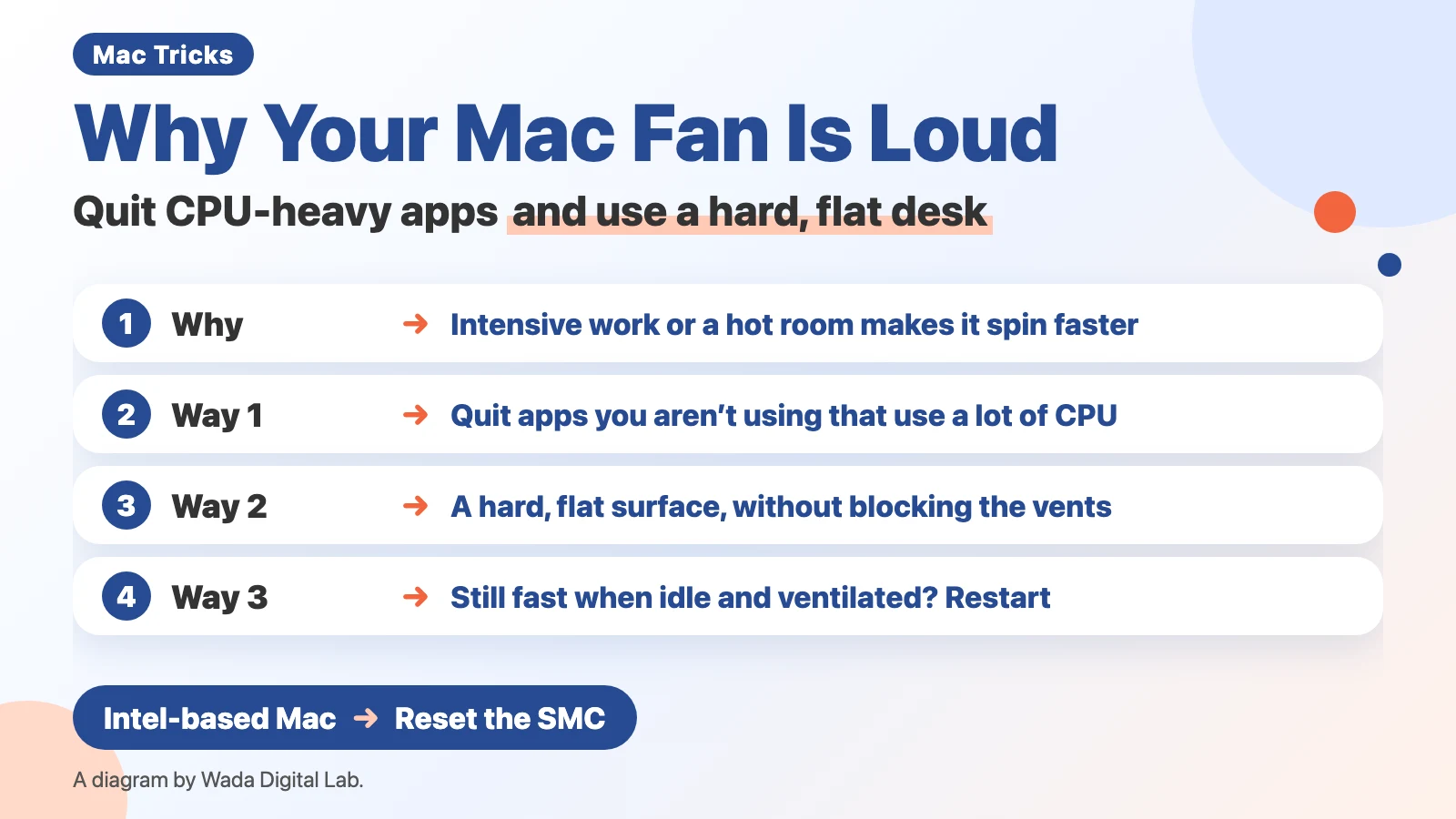
Why Mac fans get loud: they spin faster to cool the Mac during intensive work
One reason the fans get louder is intensive work for the CPU. Apple’s “About fans and fan noise in your Apple product” says:
“If your device’s processor is working on intensive tasks—such as compressing HD video, playing a graphics-heavy game, or indexing the hard drive with Spotlight after you migrate data—the fans run faster to provide additional airflow.”
Apple goes on to say you might hear the fans, especially in a quiet room, and that “This rushing-air sound is a normal part of the cooling process.” The fans run to protect the parts from heat.
We had the same experience. On a computer we used years ago, the fan noise bothered us whenever it got loud. On top of the noise, the computer was hot, so we bought a cooling pad to set the laptop on, to cool it even a little.
Way 1 to quiet it: quit apps that use a lot of CPU
Reduce what is making the fans run. There are 3 steps.
- Open Activity Monitor (in Applications > Utilities in the Finder) and click CPU at the top
- Click the % CPU heading to sort from largest to smallest, and look at the apps near the top
- If it is an app you aren’t using, select it, click the Stop button (the X at the top left of the window), and choose Quit
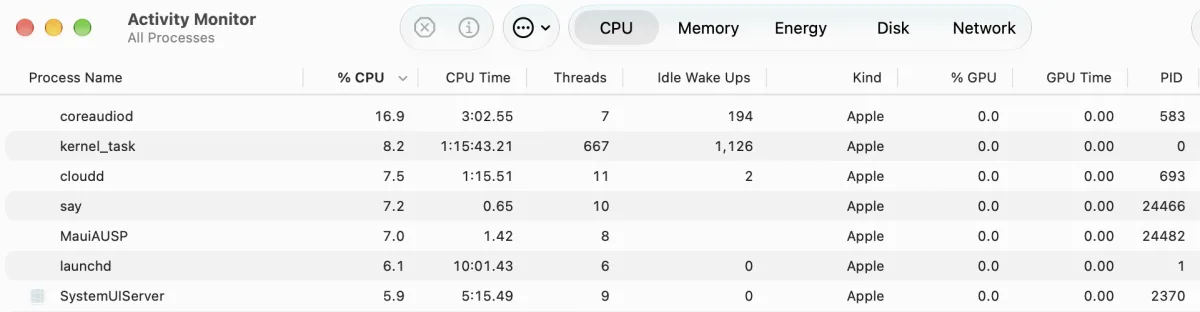
If kernel_task (the core of macOS, which also manages CPU temperature) is at the top, look at the apps below it instead. Apple says kernel_task holds other processes back to manage temperature, and you might notice more fan activity during that time. For more, see What is kernel_task on a Mac, and for how to read % CPU, How to check CPU usage on a Mac.
Way 2 to quiet it: use a hard, flat desk without blocking the vents
Where the Mac sits changes how the fans run too. The same Apple page says:
“Use your device on a hard, flat surface like a table or desk for optimal temperature control.”
Apple also says that on a soft surface like a couch, pillow, bed, or your lap, the fans might run more and the noise might change. The ambient temperature, the temperature around the Mac, matters too: when it is high, the fans turn on sooner and run faster. Apple’s “Keep your Mac laptop within acceptable operating temperatures” says to use a Mac laptop where the ambient temperature is between 50° and 95° F (10° and 35° C).
The diagram below compares, from Apple’s page, when the fans run faster and how to use the Mac quietly.
Fans run faster
Work Compressing HD video, games, Spotlight indexing
Where it sits
A couch, pillow, bed, or your lap
Reduce the source of heat
Better for temperature control
Work Quit apps you aren’t using
Where it sits
A hard, flat surface like a table or desk
Way 3 to quiet it: if the fans keep running fast when the Mac isn’t busy, close and open the lid or restart
Apple’s page also covers fans that run fast even though the Mac isn’t busy and has good airflow. The steps depend on the Mac’s chip.
- A Mac with a chip made by Apple (such as M1 or M4): close and open the lid on a laptop, or restart
- An Intel-based Mac: reset the System Management Controller (SMC, a part that handles things like power and temperature). The steps are in Apple’s “Reset the SMC of your Mac”
| Mac | Fan | If it keeps running fast (Apple’s steps) |
|---|---|---|
| MacBook Air with a chip made by Apple | None | (No fan, so no fan noise) |
| MacBook Pro, Mac mini, and others with a chip made by Apple | Yes | On a laptop, close and open the lid. Or restart |
| Intel-based Mac | Most models (the 12-inch MacBook has no fan) | Reset the SMC |
Some top search results treat resetting the SMC or NVRAM (a small memory that keeps some settings) as a step for every Mac. In Apple’s description, resetting the SMC is a step for Intel-based Macs. You can see which chip your Mac has in Apple menu > About This Mac.
Should you use an app that changes the fan speed? We don’t recommend it
Some articles recommend apps that let you set the fan speed by hand. Apple’s fan page doesn’t mention them. The Mac runs the fans by itself to match the temperature. We haven’t tried apps that change the fan speed, and we don’t recommend them. (Separately, about apps that measure temperature, Apple’s “Keep your Mac laptop within acceptable operating temperatures” says never to use third-party apps to diagnose possible hardware issues.)
An easier way: see the apps using the CPU next to the Mac’s thermal state (Memory Watch)
Opening Activity Monitor and sorting it every time you hear the fans is a chore.
We (Wada Digital Lab) make a free Mac app that watches your Mac, called Memory Watch. Its Mac Status window shows CPU Use and Mac Thermal State side by side, and the CPU by App table below lists the apps using the CPU, busiest first. The numbers are a share of the whole Mac (100%), so unlike % CPU in Activity Monitor, you can see how much of the whole Mac an app is using without dividing by the number of cores (the parts inside the CPU that do the calculating). The thermal state is shown as one of the four levels macOS reports (Normal, Slightly elevated, High, Very high).
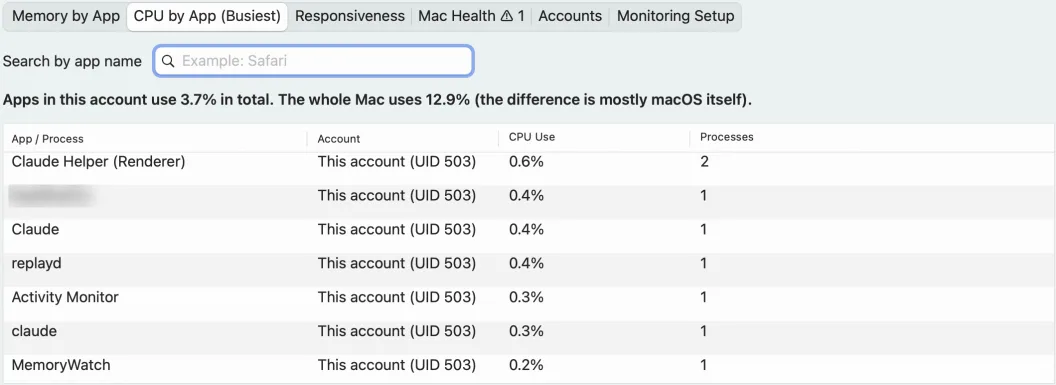
Memory Watch doesn’t read or change the fan speed, and it doesn’t quit apps. The table only shows apps running in your own account; macOS processes such as kernel_task don’t appear. There is no sign-up, no ads, and no in-app purchase. It works on a Mac with a chip made by Apple (such as M1 or M4) and macOS 14 Sonoma or a newer macOS. It does not work on Intel-based Macs or on macOS 13 or older.
Frequently asked questions
Is it the same when a Mac mini or MacBook Pro fan is loud?
Apple’s “About fans and fan noise in your Apple product” covers Apple products with fans in general. The fans run faster with CPU-heavy work, and the temperature around the Mac and where it sits make a difference. For a Mac Pro, there is also a step to check that the enclosure is locked and fully seated.
My MacBook Air’s fan is loud
A MacBook Air with a chip made by Apple has no fan. Apple’s MacBook Air page describes the M5 MacBook Air as having “a silent, fanless design.” For heat, see Is a hot MacBook Air OK?
Will a cooling pad make it quieter?
Apple’s fan page doesn’t mention cooling pads. What it says is to use a hard, flat surface and not block the vents. We haven’t measured how much a cooling pad changes the noise.
Why are the fans loud at startup?
We haven’t tested this. Apple says that after you move data over, Spotlight indexes the drive, and the fans may run faster. Look at the names of the processes at the top of % CPU in Activity Monitor.
What we checked, and Apple’s pages
We took the Activity Monitor and Memory Watch screenshots on November 12, 2026, in a separate user account we made for screenshots (MacBook Air (M2), 8 cores, 16 GB of memory, macOS 27.2, Activity Monitor 10.14, Memory Watch 1.2.1, English). We sorted by % CPU on that screen but didn’t click Quit. Our Macs are a MacBook Air (M4) and a MacBook Air (M2), both with no fan, so we haven’t checked fan noise itself. How the fans behave comes from Apple’s pages. We also haven’t tried closing and opening the lid, restarting, or resetting the SMC.
Before writing, we searched Google in the US for “mac fan loud” and read the top results (November 12, 2026): Apple’s own page, forum threads, and articles from companies that sell cleanup or data recovery services. This article puts Apple’s own words first, and separates the steps for Macs with a chip made by Apple and Intel-based Macs.
Sources: